


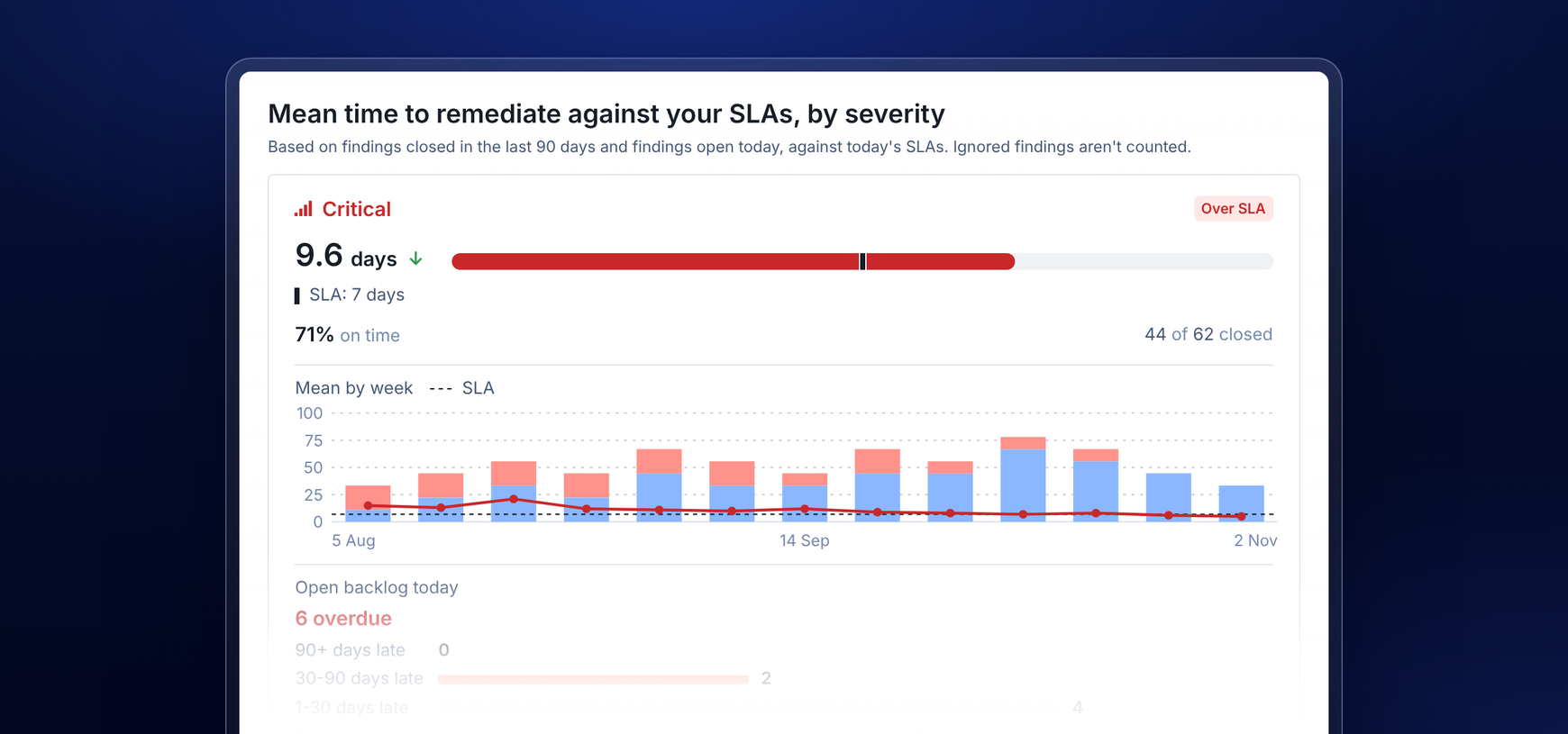
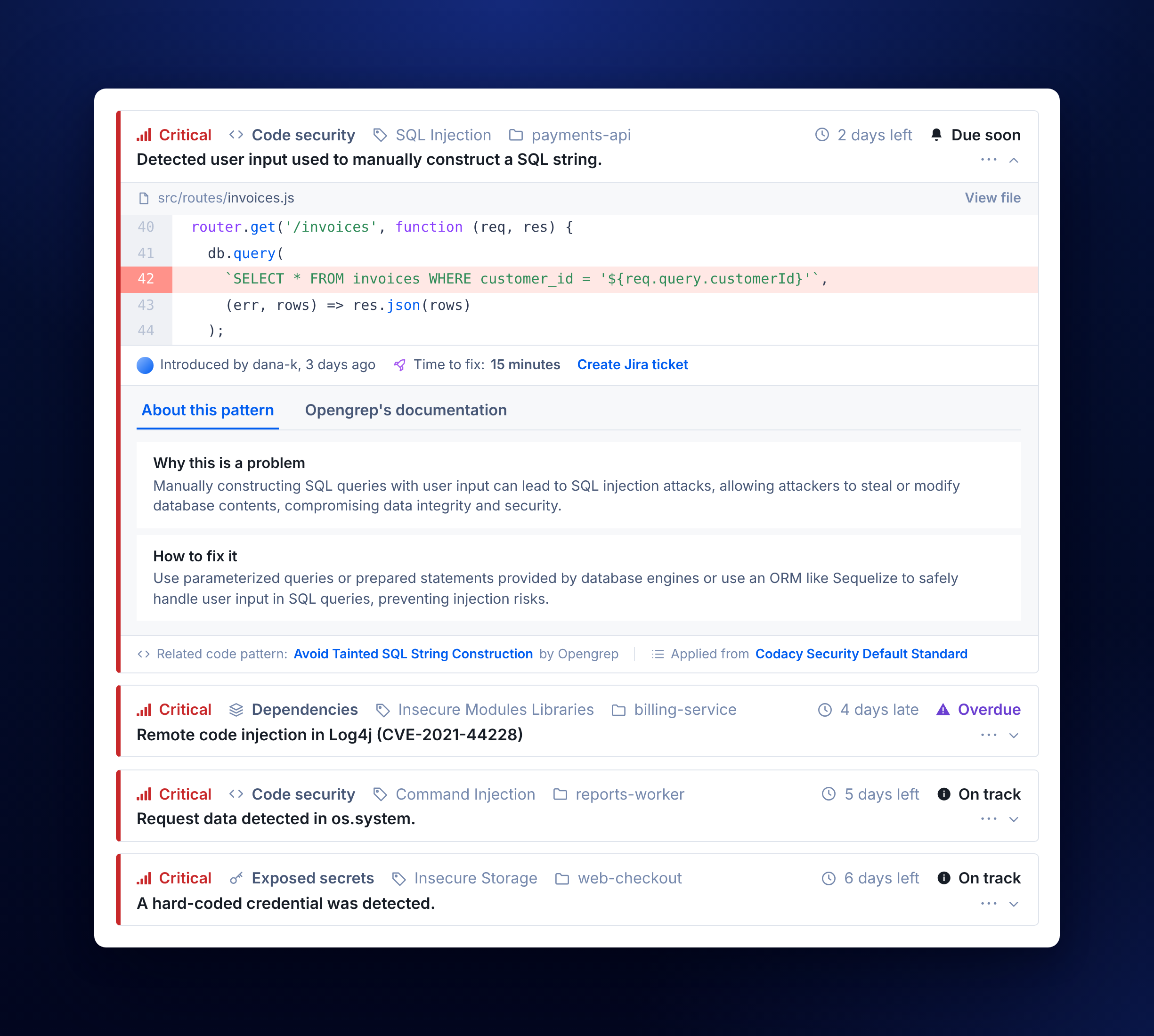
Codacy gives every security finding an SLA status: On track, Due soon or Overdue, worked out from the deadline you set for its severity. Until now that status lived on each finding, one at a time, and nowhere else.
That is fine for triage and not much use when someone asks the bigger question. Leadership, the board or a customer's security review all ask some version of "are you fixing things within the deadlines you agreed to?", and the answer used to involve exporting findings and doing the maths in a spreadsheet.
The Remediation report answers it in the product. It's a new page in Security and risk that shows, for each severity, how fast your team closes findings against its SLA, what share closed on time, and what is overdue right now.
What the Remediation report shows
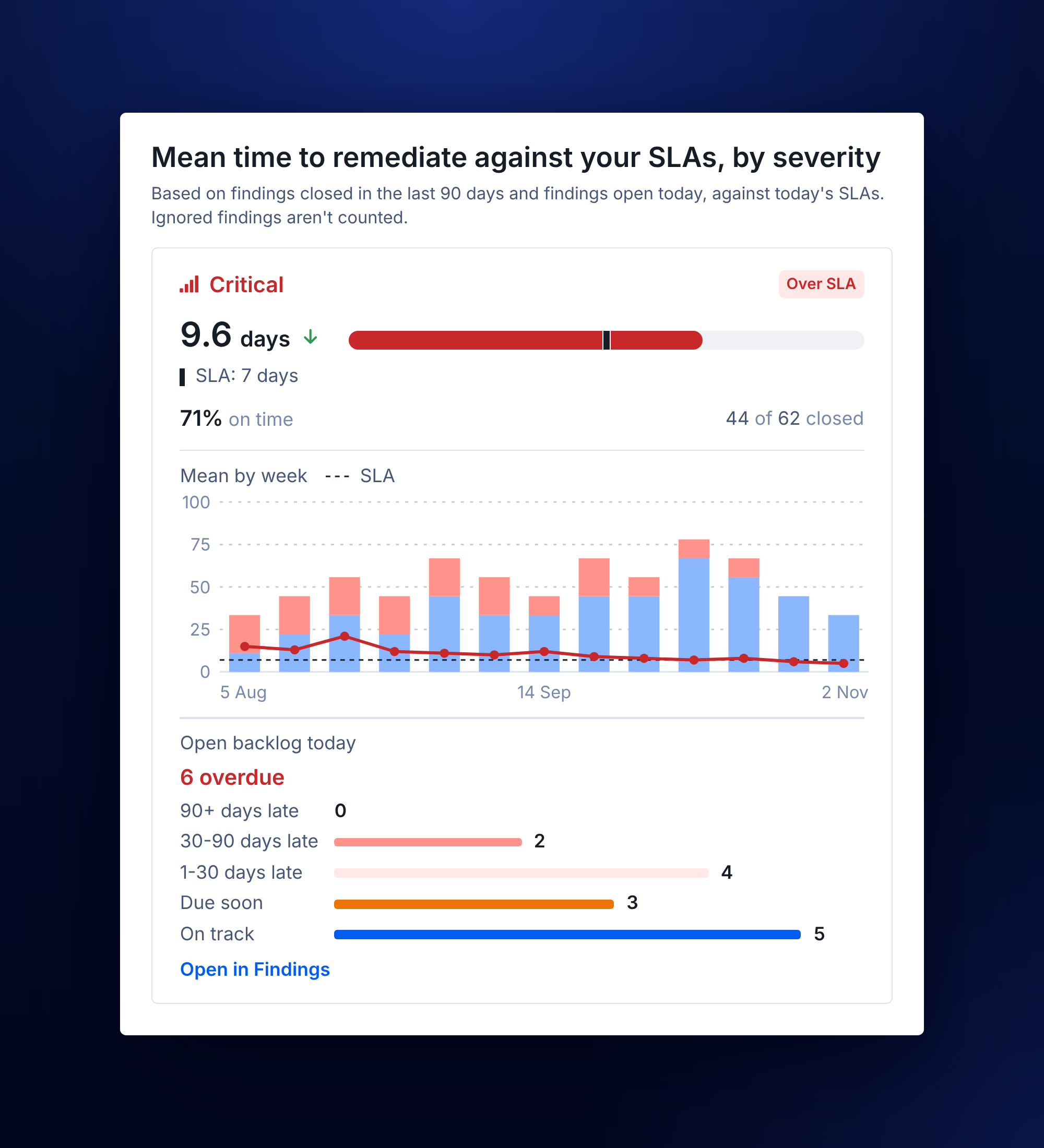
The report has one panel each for Critical, High, Medium and Low.
Each panel includes:
- a Within SLA or Over SLA badge
- the Mean time to remediate (MTTR), drawn as a bar against the SLA
- the share closed on time, with the counts behind it
- a weekly chart of the mean against the SLA
- Open backlog today: what is still open, and how late
Every source of findings counts: Codacy's own analysis, app scanning, container scanning, penetration tests, and security tickets imported from Jira.
Pull the number for your next review
Say your quarterly security review is next week. Open Security and risk, then Reports, then Remediation.
Each panel answers the question for its severity in one line. Say your SLA for High findings is 30 days: the panel might read Within SLA, with a mean time to remediate of 21.4 days and 84% closed on time (402 of 479). If the review only covers some of your code, narrow the report with Segments, Repositories and Scan types. The filters live in the page URL, so the link you send shows exactly the view you looked at.
Side note on how it counts: An ignored finding never counts as fixed, whatever the reason it was ignored, so an accepted risk can't skew the number. Findings closed within a day count like any other, nothing is hidden. And the clock starts when Codacy creates the finding, so an old Jira ticket or a pen test result isn't already late the moment it's imported.
Quick disclaimer: the report covers the last 90 days, and it measures every close in that window against the SLA you have set today. Codacy doesn't keep a history of SLA changes, so if you tighten an SLA, the past 90 days are recalculated against the new one. If you need a longer record, say six or twelve months for an audit, capture the figures each month, for example through the Codacy API, and keep them alongside your evidence.
Getting it
The Remediation report is available on all plans while it's new, and will move to paid plans in the coming weeks. Find it under Security and risk → Reports → Remediation. If you've never set SLAs, it uses Codacy's defaults (30, 60, 90 and 120 days from Critical to Low), and Configure SLAs at the top right of the report lets you customize them. The docs cover every counting rule in detail.
Find what's slipping
A good closing record can still sit next to a growing pile of findings nobody is working on. That is why every panel ends with Open backlog today, so the two numbers are always side by side.
Say High reads Within SLA, with 84% closed on time, but 37 High findings are overdue right now. The backlog section splits those 37 findings into 1-30, 30-90 and 90+ days late, counted from the deadline rather than from when the finding was opened. Below that, it shows how many are due soon and how many are on track.
Open in Findings takes you to that severity's open findings with the same segment, repository and scan type filters still applied.
Check whether you're getting faster
The other question that comes up, usually from the board, is whether things are getting better.
Next to each mean there's a trend icon for the 90 days: Slower, Faster or Steady. Hover it and it shows both ends in days. Below it, the Mean by week chart plots the weekly mean against a dashed SLA line, with bars behind it for findings closed on time and closed late.
The bars matter more than they look. When a team spends a week clearing out findings that are a year old, the weekly mean jumps. With the closes drawn underneath, that week shows as a spike in closes, and it reads as the cleanup it was.
Side note: a severity with fewer than five closes in the window shows no trend icon, since there's too little to draw a line through.
Before you open it
Check that the SLAs in Codacy match the remediation policy you've committed to. The report is only as useful as the deadlines it measures against, and many organizations are still on the defaults. And the next time someone asks whether you're fixing things on time, the answer is one link.