.svg)


There is no doubt that SonarQube is successful in the domain of code quality. But from talking to customers looking to switch from Sonar products to other code quality and security tools, we know it has limitations that some teams deem unacceptable.
So, what is the best alternative for SonarQube users or teams that need a different product to manage their code quality and code security? Here are eight of the best SonarQube alternatives in 2026.
What SonarQube Does: Features and Capabilities
First, let’s look at how you should assess SonarQube alternatives.
When considering SonarQube alternatives, you have to think holistically about what each tool offers in terms of features. More importantly, you should be aware of your specific project needs. Ask yourself and your team: are you looking for a) a complete replacement or b) a specific functionality?
SonarQube is a static code analysis tool from Sonar (SonarSource). Since Sonar renamed its products in October 2024, it comes in two forms: SonarQube Server, which you host yourself (the free SonarQube Community Build, formerly Community Edition, plus the commercial Developer, Enterprise, and Data Center editions), and SonarQube Cloud (formerly SonarCloud), the fully managed SaaS version. Its free IDE extension, SonarQube for IDE, was previously called SonarLint. SonarQube offers two core features:
- Code quality analysis. The tool detects bugs, code smells, and maintainability issues across more than 40 languages and frameworks, and provides detailed reports on code duplication, complexity, and technical debt. It also offers a quality gate feature to set acceptable thresholds for various metrics.
- Security analysis. SonarQube identifies security hotspots and vulnerabilities and maps them to standards such as the OWASP Top 10 and CWE (Common Weakness Enumeration). It includes SAST (Static Application Security Testing), with taint analysis in the commercial editions, along with secrets detection and infrastructure-as-code (IaC) scanning. Software composition analysis (SCA) for open-source dependencies is sold separately as the SonarQube Advanced Security add-on.
Sonar has also added AI-focused features, including AI CodeFix (LLM-generated fix suggestions), AI Code Assurance for reviewing AI-generated code, and a SonarQube MCP Server for AI coding assistants. In May 2026, it acquired the AI code review tool Gitar.
Beyond these features, you might also want multi-language support, issue tracking, dashboards, CI/CD integrations, and rule sets. Some tools will offer all these (and more), and some will focus entirely on a single feature, such as security. Your specific needs will determine the best tool for you.
A few things to keep in mind:
- Quality and security go hand in hand: High-quality code is inherently more secure. Tools that address both aspects simultaneously can help teams build more robust and reliable software while reducing vulnerabilities.
- Performance impact matters: Consider how the tool affects your development workflow. Look for solutions that offer quick analysis times and efficient resource usage to maintain developer productivity.
- Customization and flexibility: Tailoring rules, thresholds, and reports to your specific project needs can significantly enhance the tool's effectiveness. Seek alternatives that offer effortless customization options.
- Integration ecosystem: A tool that seamlessly integrates with your existing development stack (IDE, version control, CI/CD pipelines, issue trackers) can significantly streamline your workflow and improve adoption rates among team members.
SonarQube Limitations and Common Complaints
Why might you look for a SonarQube alternative? Here are some of the main problems and limitations with SonarQube:
- False positives: SonarQube can sometimes generate false positive results, incorrectly identifying code as problematic. This can be time-consuming for developers to review and validate.
- Steep learning curve: SonarQube is complex, especially for newcomers, and configuring and fine-tuning the tool to meet specific project requirements can be challenging.
- Not engineer-friendly: If the SonarQube deployment is controlled by non-engineering management, it can be used as a policing tool rather than a collaborative improvement tool.
- Integration issues: Some engineers have reported problems adding SonarQube to their CI/CD pipelines, a critical feature for these tools.
- Pricing tied to code size: SonarQube Cloud's paid plans and the commercial SonarQube Server editions are priced by the number of lines of code analyzed, so growing repositories or adding new projects can push you into a higher tier and higher costs.
In your search for a SonarQube alternative, consider both what SonarQube offers you need to replace and whether these alternatives will improve your developer experience.
Here are eight of the best SonarQube alternatives for teams looking to improve code quality and security.
Best SonarQube Alternatives in 2026
Codacy: Code Quality and Security for AI-Assisted Engineering
Codacy is an alternative to SonarQube for teams that want a single platform for code quality, security, and AI governance. It brings automated analysis into developer workflows so engineering teams can identify issues early and keep standards consistent as their codebases grow.
Key Features:
- Comprehensive Code Analysis: Codacy analyzes code quality and security across more than 40 languages, flagging maintainability issues, code smells, duplication, complexity, and security risks such as OWASP Top 10 vulnerabilities, and suggesting fixes.
- Security Coverage Across the SDLC: Codacy's security scanning includes Static Application Security Testing (SAST) for source code, Software Composition Analysis (SCA) for open-source dependencies and malicious packages, hard-coded secrets detection, and Infrastructure-as-Code (IaC) analysis for Terraform, Kubernetes, CloudFormation, and more. On its Business plan, Codacy also offers dynamic application security testing (DAST) and container image scanning.

- Developer-First Experience: Codacy integrates with GitHub, GitLab, and Bitbucket, and its IDE extension for VS Code, IntelliJ, Cursor, and Windsurf brings analysis into the editor. Codacy Guardrails uses an MCP server to connect that analysis to AI coding agents, so AI-generated code can be checked and fixed against your rules as it's written.
- AI-Assisted Pull Request Review: The AI Reviewer combines Codacy's deterministic, rule-based static analysis with AI-based context and prioritization. It draws on the pull request's metadata and diff, related files, and, when the Jira integration is enabled, linked Jira tickets to flag logic flaws, missing tests, unnecessary complexity, and security gaps, with suggested fixes in the pull request. It's currently available for GitHub repositories on the Team and Business plans.
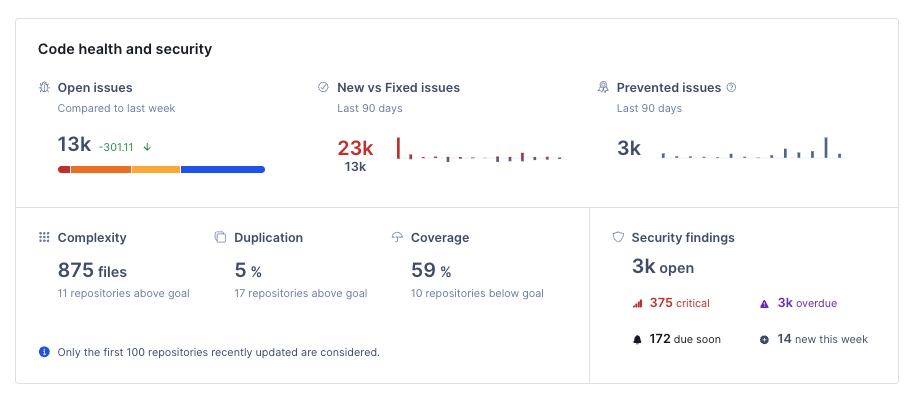
- Continuous Monitoring: Codacy scans repositories continuously and provides centralized dashboards that track code quality, security findings, duplication, complexity, and test coverage across projects and teams, including an organization-wide Security and Risk Management dashboard.
- Test Coverage: Codacy tracks test coverage in a unified dashboard and can use coverage thresholds as merge gates, blocking pull requests that would add untested code.
Why Choose Codacy Over SonarQube?
One of Codacy’s main advantages is its developer-first experience. The platform plugs into your team’s coding agents, IDEs, and Git workflows, so setup effort is low and feedback arrives while code is being written and reviewed.
Codacy also bundles its security scanning into the same platform. SAST, SCA, secrets detection, and IaC analysis run alongside code quality checks, whereas SonarQube's dependency scanning requires the separately sold Advanced Security add-on. Engineering leaders get unified visibility across teams and repositories, and developers get prioritized feedback in their pull requests.
Codacy combines developer experience, AI governance, compliance reporting, and actionable insights in one place, which makes it a good fit for teams that want to ship fast without accumulating risk.
A unified alternative to SonarQube
Codacy brings code quality and security together in one platform. Detect issues early, reduce noise in pull requests, and keep engineering teams focused on shipping clean code in minutes.
DeepSource: AI Code Review and Static Analysis
DeepSource offers an alternative to SonarQube that addresses both code quality and security. It now describes itself as an AI code review platform, combining static analysis with AI review agents in a developer-friendly workflow.
Key Features:
- Comprehensive Code Analysis: DeepSource has 16 core analyzers covering languages such as Python, JavaScript/TypeScript, Java, Go, Rust, C#, C/C++, Ruby, and PHP, plus Docker, Shell, SQL, and Terraform. Its 5,000+ deterministic rules catch bugs, anti-patterns, performance problems, and security vulnerabilities, and an AI review agent adds context-aware feedback on pull requests.
- Focus on Low-Noise Results: DeepSource says its analysis is built to surface "high-signal, low false-positive issues," and it lets teams suppress the false positives that do appear. This addresses one of the major pain points associated with SonarQube.
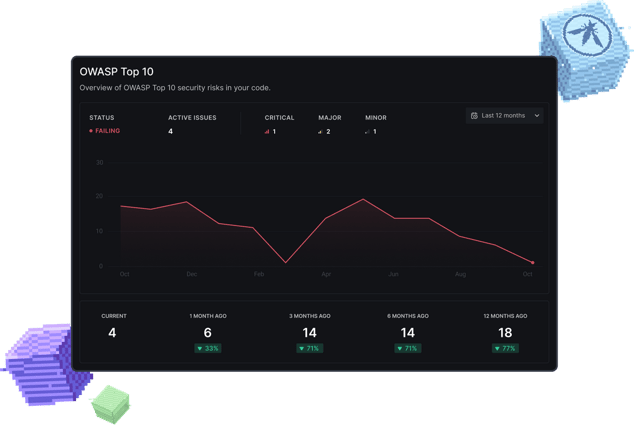
- Security-Focused Approach: DeepSource covers vulnerability detection in code, open-source dependency scanning (SCA) with license compliance, secrets detection, and IaC review for Terraform and CloudFormation, with reports mapped to industry standards like the OWASP Top 10 and SANS Top 25.
- Developer-Friendly Integration: DeepSource integrates directly with GitHub, GitLab, Bitbucket, and Azure DevOps and runs its core analysis on its own infrastructure, so no CI setup is required. It analyzes every pull request, and teams that need to keep code in-house can use the self-hosted DeepSource Enterprise Server.
Like SonarQube's quality gates, DeepSource lets teams set up PR gates that block pull requests that violate their rules. DeepSource also offers OWASP Top 10 and SANS/CWE Top 25 reports, code coverage tracking, and Autofix, which provides pre-generated patches for many issues.
Why Choose DeepSource Over SonarQube?
DeepSource's emphasis on reducing false positives addresses one of the major complaints about SonarQube, potentially saving developers significant time in reviewing and validating issues.
DeepSource's integration into existing Git workflows and emphasis on providing context for issues aligns well with modern development practices, potentially leading to higher developer adoption. It also has a more straightforward configuration and no need for CI setup for its core analyzers, offering a smoother setup process compared to SonarQube's sometimes steep learning curve.
DeepSource’s focus on reducing false positives and providing actionable insights could make it an attractive option for teams looking to improve their code review process and overall code health. But while DeepSource says it offers a low false positive rate, reviews don’t always concur, and some features, such as AI review beyond the included credits and SCA, are billed on usage, so costs can vary with how much you use them.
Aikido: Unified Application Security Platform
Aikido is a security platform that includes static application security testing (SAST), open-source dependency scanning (SCA), secrets detection, infrastructure-as-code (IaC) scanning, authenticated DAST and API fuzzing, cloud security posture management (CSPM), container image scanning, and runtime protection, meaning it offers broader security coverage than just code checks. It has also added AI-powered code quality reviews and AI pentesting.
Key features:
- Security-focused static analysis: Detects potential vulnerabilities, risky patterns, and maintainability issues across supported languages.
- AI pentesting: Aikido Attack uses AI agents to probe web apps, APIs, and infrastructure for exploitable flaws. Findings are reported only after they've been exploited and confirmed, and come with remediation guidance and audit-ready reports.
- Dependency and configuration insights: Surfaces risks in open-source dependencies and infrastructure configurations, helping reduce exposure across the application stack.
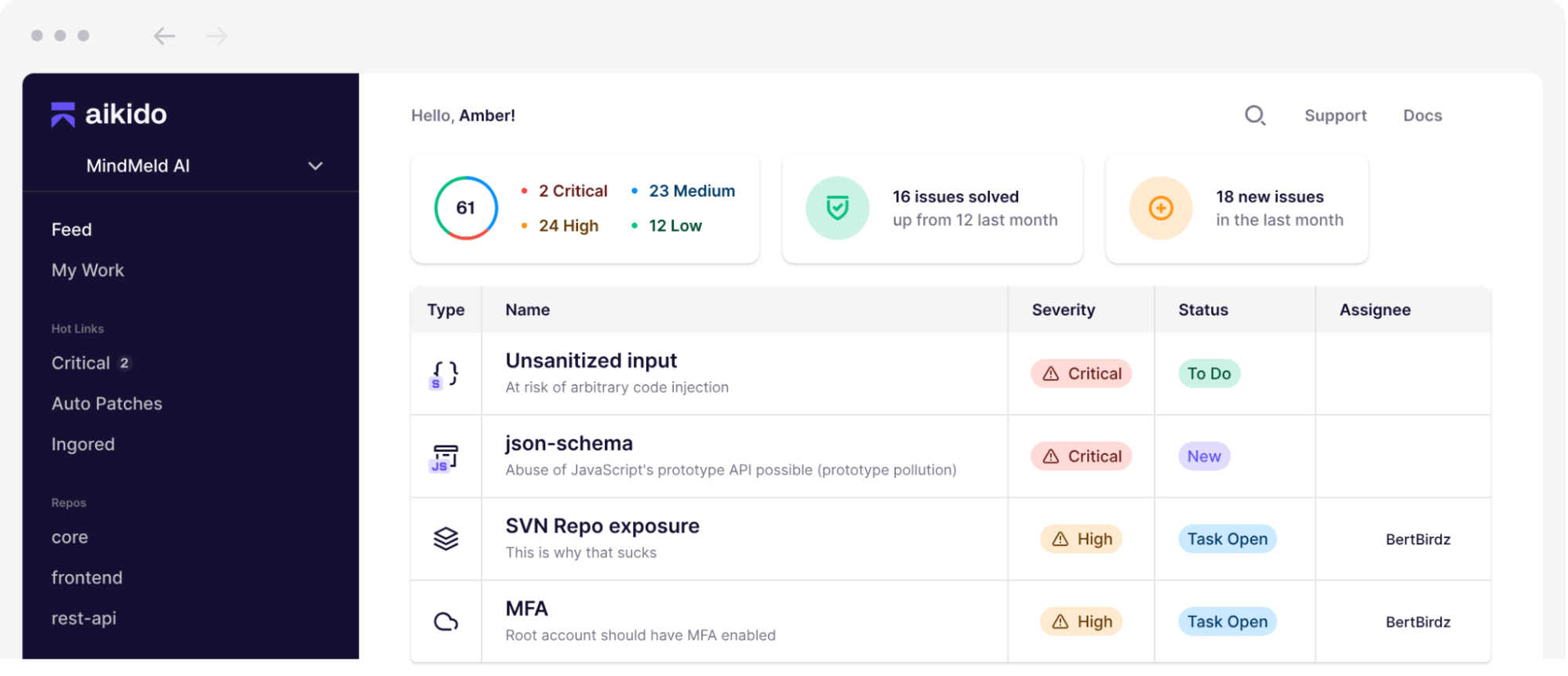
- AI code quality reviews: Aikido's AI Code Quality comments on pull requests about logic bugs, edge cases, and maintainability, rates repositories on maintainability, readability, performance, and reliability, and supports custom rules.
- Integrations with version control: Works with GitHub, GitLab, Bitbucket, and Azure DevOps to surface findings in context, so teams can review and remediate issues within their workflow.
Why Choose Aikido Over SonarQube?
Aikido suits teams whose main priority is security breadth with a simple setup. Instead of deploying and tuning a separate tool for each area, teams get code, cloud, and runtime security in one platform, plus AI-assisted pull request reviews for code quality. Keep in mind that some advanced AI features, such as Deep PR Reviews and AI pentesting, consume credits on top of the base plan, and teams that rely heavily on SonarQube's quality gates and maintainability metrics should check how Aikido's code quality features map to them.
CodeRabbit: AI Code Reviews for Pull Requests, IDEs, and the CLI
CodeRabbit is an AI-driven code review tool that helps developers spot issues in pull requests, in their IDE, and from the command line. It is designed as a developer-focused add-on to make code reviews smoother and boost maintainability without requiring a full-scale static analysis deployment.
Key features:
- Quality‑focused review: Evaluates PR changes for logic errors, stylistic inconsistencies, duplication, and maintainability concerns based on contextual analysis.
- Security‑aware feedback: Surfaces potential security issues and risky patterns in code changes. CodeRabbit Security, currently in open beta, adds repository-level Deep Scans for exploitable vulnerabilities, exposed secrets, and IaC misconfigurations, billed separately based on usage.
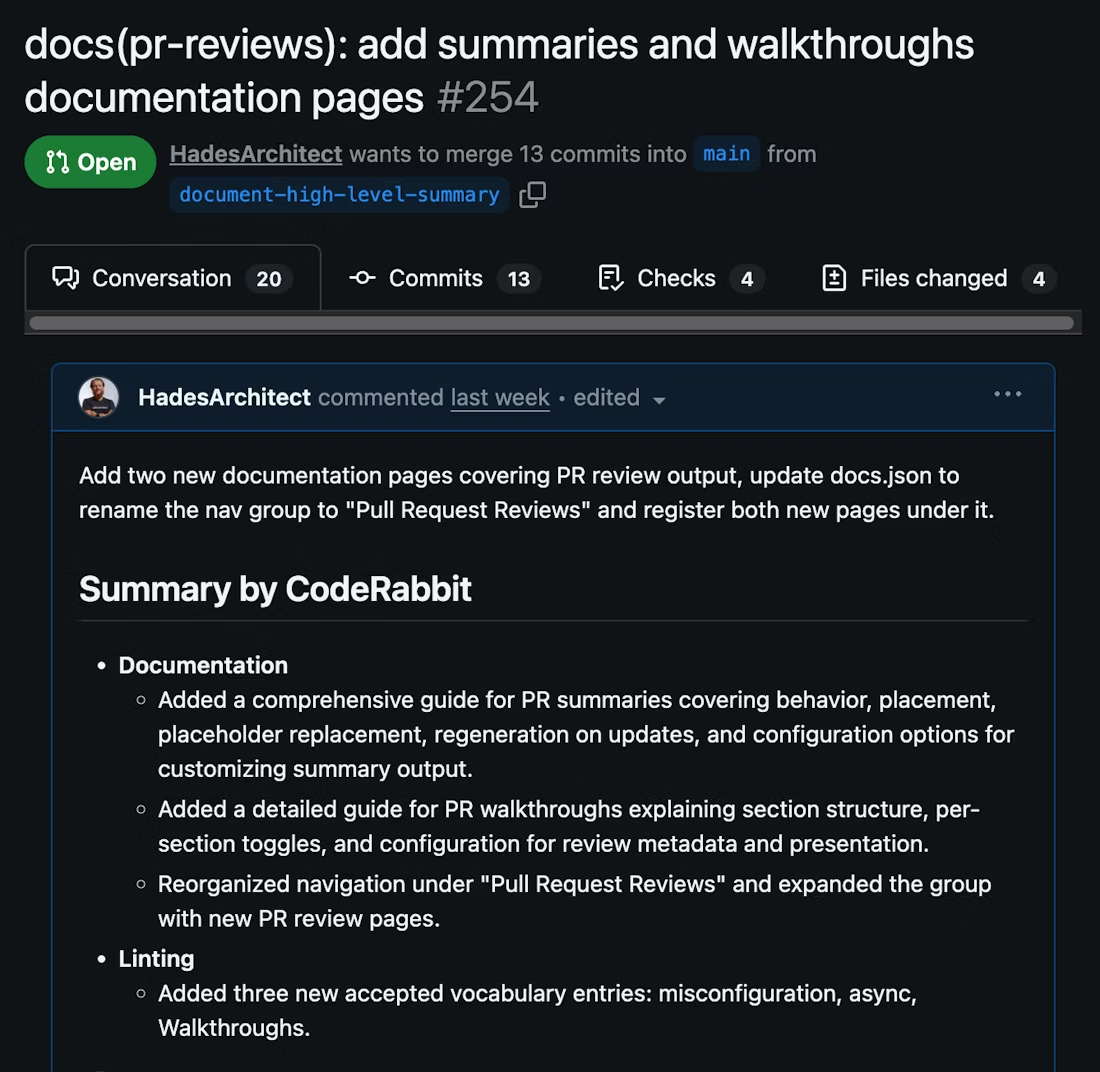
- Inline recommendations: Feedback and suggested fixes appear directly in pull requests, and the VS Code, Cursor, and Windsurf extensions and the CLI can review changes before they're committed. Engineers can see suggested fixes right alongside the changes, making reviews faster and more focused.
- Toolchain integrations: Works with GitHub, GitLab, Azure DevOps, and Bitbucket, and connects to Jira and Linear for issue context. Feedback arrives in familiar workflows, so teams don’t need to switch platforms or disrupt their pipeline.
Why Choose CodeRabbit Over SonarQube?
CodeRabbit is a good option for smaller teams that want a lightweight and developer-centric solution for AI-assisted code reviews. Its setup is straightforward, and it provides insights directly where developers work. Teams can enforce basic coding standards and detect common issues without navigating complex configurations.
While it covers security-aware and quality checks, CodeRabbit is not a full static analysis platform, and its Deep Scan doesn't perform dependency scanning (SCA). Larger teams or those working with more layered projects that need continuous quality metrics, dependency scanning, and organization-wide monitoring across repositories may need to complement it with additional tools.
Snyk: Developer-First Platform for Application Security
Unlike Codacy, which combines code quality and security within a unified platform, Snyk takes a different approach, focusing exclusively on supporting engineering teams to find and fix security issues early on. It now positions itself as an AI security platform. It's an excellent choice for teams looking to enhance their security practices without necessarily replacing their existing code quality tools. However, for teams looking to move away from SonarQube entirely, Snyk must be complemented with a separate code quality solution.
Key Features:
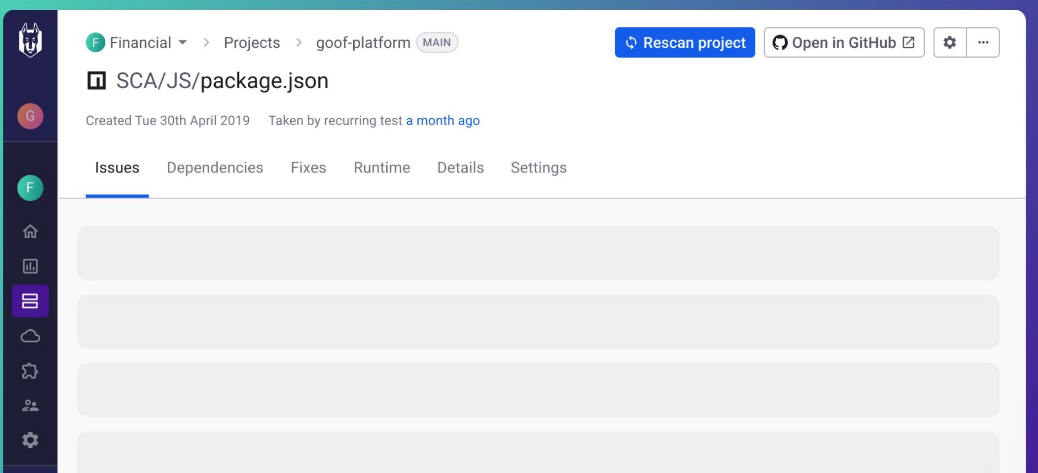
- Developer-First Security: Snyk is designed with developers in mind, integrating smoothly into existing workflows and tools and surfacing security issues in IDEs, PRs, and CI/CD pipelines, so teams can shift security left and address vulnerabilities early in the development process.
- Comprehensive Vulnerability Analysis: Snyk’s tools focus on spotting a wide range of security risks across several layers:
- Snyk Code: Static application security testing for your own code, powered by Snyk's DeepCode AI engine.
- Snyk Open Source: Scans dependencies for known security issues.
- Snyk Container: Secures your container images and Kubernetes workloads.
- Snyk IaC: Finds and fixes infrastructure-as-code misconfigurations in code.
- Snyk API & Web: Dynamic testing (DAST) for APIs and web apps.
- Snyk Secrets: Stops hardcoded secrets before they're committed.
- Snyk Code: Static application security testing for your own code, powered by Snyk's DeepCode AI engine.
- Advanced Vulnerability Data: Snyk maintains its own hand-curated Snyk Vulnerability Database that informs its analysis and prioritization as it works on your code.
- Flexible Deployment Options: Snyk offers a CLI for local scans, IDE plugins for real-time feedback, and CI/CD integrations for automated pipeline security checks.
- AI-Powered Fixes and Prioritization: Snyk Agent Fix suggests one-click AI fixes in the IDE and pull requests, and DeepCode AI supports context-aware risk scoring so teams can focus on the most critical security issues first. This reduces alert fatigue and helps speed up remediation.
Why Choose Snyk Over SonarQube?
If your primary concern is security, Snyk’s security specialization gives you deeper coverage of security risks than SonarQube provides. While SonarQube offers some security features, Snyk is entirely focused on security at every stage of the SDLC.
Snyk's integrations and developer-centric design make it more likely to be embraced by development teams, addressing the "not engineer-friendly" complaint sometimes leveled at SonarQube. Snyk’s cloud-native approach to container and IaC security extends protection beyond just application code, crucial in modern cloud environments.
However, because Snyk does not offer comprehensive code quality analysis (think duplication, complexity, and maintainability reporting), teams in need of both security and quality data will have to integrate a separate quality solution alongside Snyk.
Checkmarx: Enterprise Application Security Testing Platform
Checkmarx offers a cloud-native application security platform called Checkmarx One, a robust alternative to SonarQube for security. It's designed to address application security concerns across the entire software development lifecycle (SDLC), making it suitable for enterprises looking for a unified AppSec solution.
Key Features:
- Comprehensive Application Security: Checkmarx One provides a full suite of AppSec tools, including SAST, SCA, secrets detection, IaC security, API security, container security, malicious package detection, and DAST, tied together by application security posture management (ASPM). This broad coverage allows teams to secure applications from the first line of code to deployment in the cloud.
- Unified Platform: Unlike SonarQube, which focuses on static analysis, Checkmarx One consolidates multiple AppSec tools into a single, cloud-based platform. This integration eliminates the need for various tools and fragmented workflows, potentially addressing the integration issues some users face with SonarQube.
- AI-Powered Analysis: The Checkmarx One Assist family of AI agents includes Developer Assist, which flags issues in the IDE as code is written, and Triage Assist and Remediation Assist, which rank findings and propose fixes. Checkmarx also offers AI supply chain security features, such as an AI inventory (AI-BOM), to address emerging AI-related risks.
- DevSecOps Integration: Checkmarx One integrates with IDEs (VS Code, JetBrains, Visual Studio, and Eclipse), source code managers (GitHub, GitLab, Azure DevOps, and Bitbucket), CI/CD tools such as Jenkins and TeamCity, and feedback tools such as Jira and Slack. This focus on integration could address the "not engineer-friendly" complaint sometimes leveled at SonarQube.
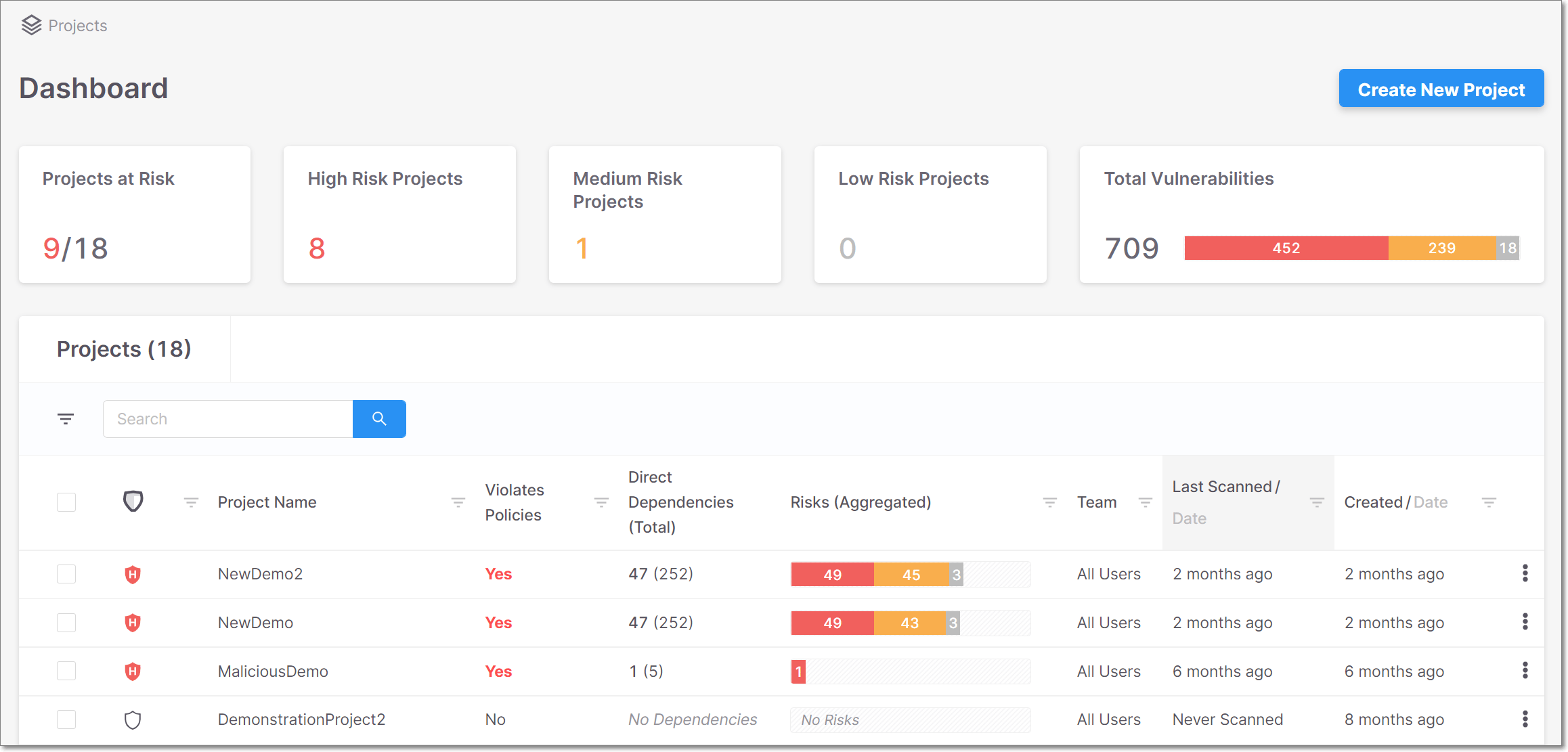
Built on the cloud and for the cloud, Checkmarx One should be well-suited for securing modern cloud-native applications. Checkmarx also offers on-premises SAST for teams that can't use the cloud, though self-managed deployments need capacity planning: its documentation recommends filtering results or adding system resources for very large scans.
Why Choose Checkmarx Over SonarQube?
While SonarQube offers some security features, Checkmarx provides a more holistic approach to application security, covering a more comprehensive range of security aspects throughout the SDLC. Checkmarx One's consolidation of multiple AppSec tools into a single platform could simplify management and reduce the total cost of ownership compared to using SonarQube alongside additional security tools.
Checkmarx One is an enterprise-grade solution that potentially offers better scalability and support for large, complex organizations than SonarQube. However, as an enterprise-focused security solution, it doesn't cover code quality, and it might have a higher price point and a steeper learning curve for smaller teams or organizations.
Veracode: Cloud Platform for Application Security Testing
Veracode offers an application security platform, which it now calls an application risk management platform, that serves as a good alternative to SonarQube. It provides a range of tools designed to integrate security seamlessly into the SDLC, making it an attractive option for organizations looking to enhance their DevSecOps practices.
Key Features:
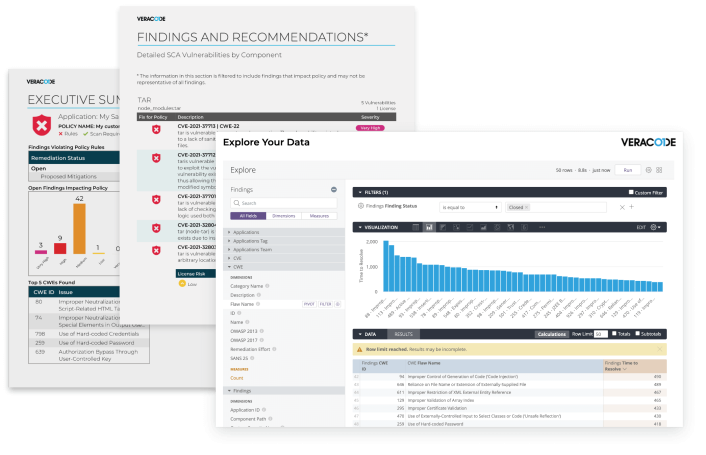
- Comprehensive Security Coverage: Veracode provides a full suite of application security testing tools, including SAST, DAST, SCA, and container and IaC security, plus Package Firewall to block risky open-source packages and penetration testing as a service (PTaaS). This broad coverage allows teams to secure applications throughout the development process.
- Frictionless Developer Experience: Veracode integrates with IDEs (Eclipse, JetBrains, Visual Studio, and VS Code), CI/CD tools such as Jenkins and Azure DevOps, and issue trackers such as Jira, bringing security directly into developers' workflows.
- Accurate Analysis and Low False Positives: Veracode advertises a 1.1% false-positive rate, backed by decades of security research. This accuracy helps developers focus on real issues rather than wasting time on false alarms, a contrast to SonarQube's reported false positive problems.
- Remediation Guidance and Prioritization: Veracode Fix uses AI to suggest fixes for security flaws, and Veracode Risk Manager (ASPM) gives teams a unified view of risk to prioritize remediation.
Veracode also offers hands-on Security Labs and eLearning, helping developers learn about security while they work. This can help address the steep learning curve often associated with security tools like SonarQube.
Why Choose Veracode Over SonarQube?
While SonarQube offers some security features, Veracode provides a more holistic approach to application security, covering static, dynamic, and composition analysis in a single platform. With its low advertised false-positive rate and AI-assisted fixes, Veracode could save developers significant time compared to SonarQube's sometimes noisy results.
Veracode's extensive integrations and focus on working within existing developer environments address the "not engineer-friendly" complaint sometimes leveled at SonarQube, and Veracode's interactive developer education features can help teams build security knowledge over time, potentially easing the steep learning curve associated with security tools.
Although Veracode offers a broad range of security features, its capabilities in code quality analysis are not as extensive as some alternatives. Teams heavily focused on improving overall code quality, in addition to security, might find themselves needing supplementary tools to fully meet their needs. In addition, some reviewers report that the platform can be slow to work with on large applications.
JetBrains Qodana: Static Analysis for JetBrains Ecosystems
JetBrains Qodana is a static code analysis platform designed to bring JetBrains IDE inspections into CI/CD pipelines. For engineering teams, especially those already utilizing JetBrains tools, it provides an alternative to SonarQube for consistent code quality checks across their automated pipelines and development environments. It's available as Qodana Cloud or as a self-hosted deployment, with a free Community license and paid Ultimate and Ultimate Plus licenses priced by active contributors.
Key features:
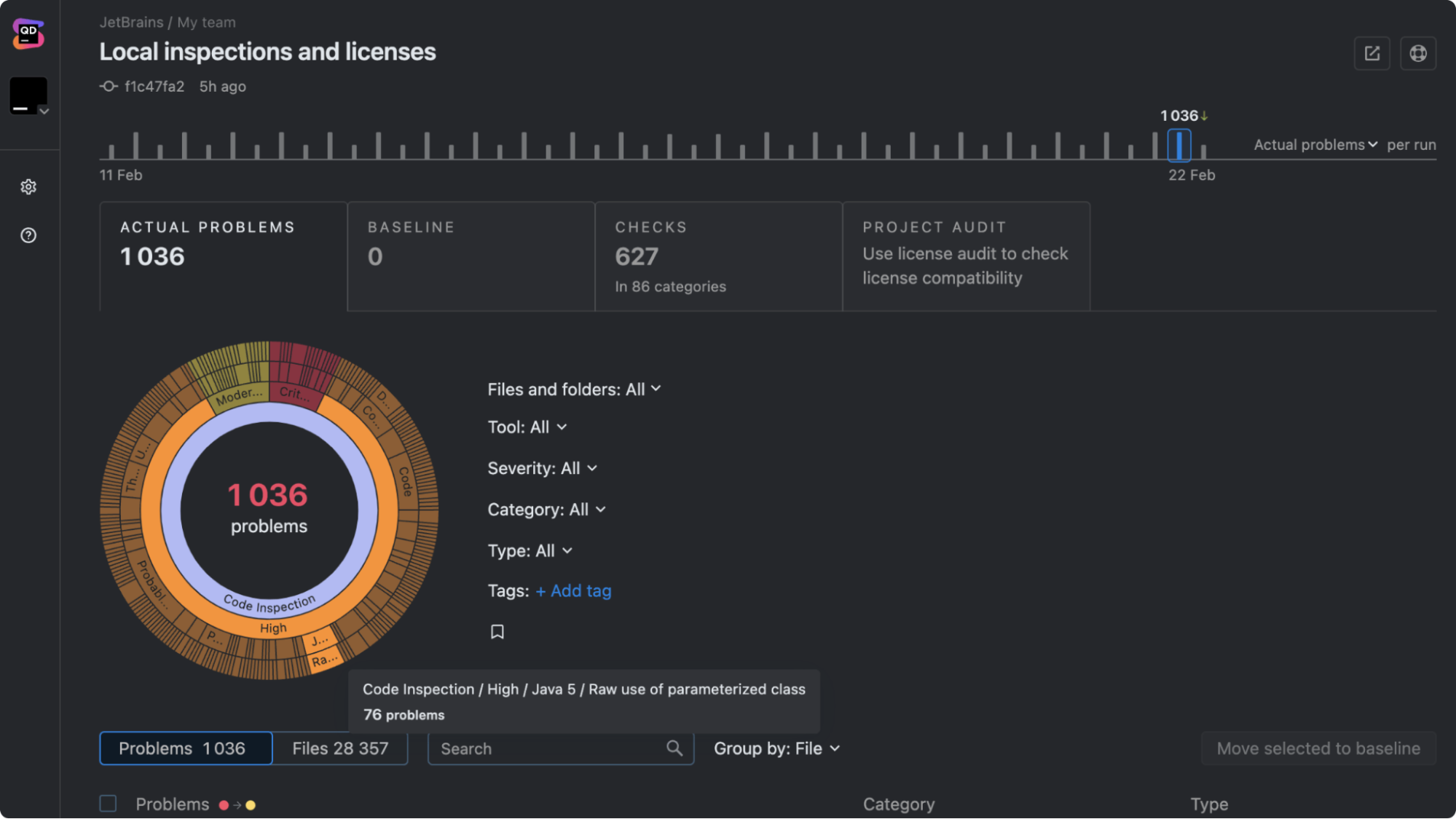
- IDE-Level Static Analysis: Qodana runs the same inspections used in JetBrains IDEs inside CI pipelines, covering 60+ languages. The team can catch issues such as code smells, potential bugs, and style violations.
- Tight JetBrains Integration: Qodana integrates directly with popular JetBrains IDEs such as IntelliJ IDEA, PyCharm, and WebStorm, and reports can also be reviewed in Visual Studio Code. Developers can see issues locally in their IDE and then enforce the same checks automatically in CI/CD pipelines.
- Code Quality and Security Checks: The platform analyzes code for maintainability issues, vulnerabilities, and coding standard violations. The Ultimate Plus license adds taint analysis for supported linters, a vulnerability checker for dependencies, and license audits. Qodana integrates with CI/CD systems including GitHub Actions, GitLab CI/CD, Azure Pipelines, Jenkins, and TeamCity, and can analyze pull requests on GitHub.
- Configurable Inspections and Policies: To enforce consistent coding standards across repositories, teams can customize inspection profiles, adjust rules, and define quality gates.
Qodana also provides dashboards and reports that give teams visibility into code issues detected during automated scans.
Why Choose JetBrains Qodana Over SonarQube?
For teams heavily invested in JetBrains tools, JetBrains Qodana can provide a more integrated experience than SonarQube. Using the same inspections developers already rely on in their IDEs, it helps make sure that code quality checks remain consistent from local development to CI pipelines.
Qodana’s focus on IDE-driven static analysis can also make it easier for developers to address issues earlier in the development workflow, which helps reduce friction compared with external scanning tools.
However, Qodana is primarily focused on static analysis and code quality rather than providing a broad platform for both code quality and security, and its deeper security checks require the Ultimate Plus license. Teams looking for deeper security capabilities or unified visibility across quality, security, and governance may still need additional tools alongside Qodana.
Why Consider Codacy as a SonarQube Alternative
SonarQube is a mature and widely used tool, but teams that want less configuration overhead and more security coverage in one place may find Codacy a better fit. Automated guardrails in the IDE and in pull requests catch quality and security issues early, so teams are able to move quickly without adding technical debt or vulnerabilities to their repositories.
The platform also makes compliance and governance practical for everyday development. Continuous scans, merge gates, and exportable reports help keep the evidence available without adding manual work for your team.
Codacy brings code quality, security, and AI governance into one platform. Engineering leaders get consistent visibility, centralized standards, and AI-assisted code governance across the entire codebase.
Every team’s needs are different, so weigh each tool on this list against your stack, security requirements, and budget. If you're looking for an alternative to SonarQube that brings code quality, security, and governance together, Codacy is built for that.
Start your free trial or book a demo below to see how Codacy improves code quality and security across your repositories.
A unified alternative to SonarQube
Codacy brings code quality and security together in one platform. Detect issues early, reduce noise in pull requests, and keep engineering teams focused on shipping clean code in minutes.