.svg)

Picture this. It's a Thursday afternoon and your CTO drops into your Slack DMs: "I need a list of every AI tool our engineering teams are using. The board wants it for next week's meeting."
You start pulling it together. You know a few developers are on Copilot. You've seen some Cursor configs floating around in PRs. Someone on the backend team mentioned Claude Code last month. But that's anecdotal. You don't have a list, and you definitely don't have one that covers every repo.
So you do what most engineering managers do. You send out a survey. Half the team fills it out, but the answers are inconsistent. One person lists “ChatGPT” without specifying whether they mean the web app or the API. Another says “none” even though you've seen AI-generated commit trailers in their PRs. By the time you compile the results, you're not confident in them, and you know they'll be outdated within a week.
This is the shadow AI visibility problem, and nearly every engineering organization is facing it right now.
Today we are shipping AI Inventory to help close that gap. Here’s a quick demo from our engineers Alejandro and Luís, to show how it works:
The gap between AI adoption and shadow AI visibility
AI coding tools are spreading through engineering teams faster than any technology shift in recent memory. According to Stack Overflow's 2025 Developer Survey, 84% of developers now use or plan to use AI coding tools in their development workflow. That adoption is largely bottom-up. Developers pick the tools that make them faster, and they don't wait for a procurement process to start.
That's a good thing for productivity. But a quick proliferation of AI tools in codebases can become an issue for anyone responsible for what's running under the hood.
AI usage is now happening at commit-level speed, not procurement speed. The challenge is that most organizations have no systematic way to answer a basic question: What AI tools, models, libraries, and API integrations are present across our repositories? According to Grip Security, 91% of AI tools in organizations are unmanaged. That doesn't mean they're malicious. Most developers are acting in good faith, using free-tier tools without realizing the data governance implications. But unmanaged is still ungoverned, and ungoverned creates risk you can't size.
Why engineering teams can’t see shadow AI
The State of AI-Native Application Security 2025 report speaks clearly: Shadow AI (or the unregulated use of AI tools within a codebase) is invisible to most engineering teams, and this creates nothing but issues. Control is falling behind AI sprawl: According to 74% of respondents, this hyper-accelerated, unchecked adoption is set to increase risk for organizations. And this is also because the threat landscape is constantly changing, with increased use of AI tools across the board making applications less secure rather than more so.
Shadow AI being hard to spot is due to the fact that it functions beyond conventional security boundaries, often embedded directly into a developer’s platform, IDE, or browser. This way, AI usage remains virtually hidden.
The term shadow AI is a direct descendant of the concept of “shadow IT”, which refers to unauthorized software utilized at organization level. But while shadow IT typically leaves some tracks behind (network logs, files, etc.), shadow AI is more deeply embedded in developer workflows and is often harder to observe through traditional governance and security tooling. As a result, your organization is scrambling to figure out which AI tools your development team uses, to what extent, and is desperate for some healthy AI governance.
Why engineering managers can’t rely on surveys or manual audits
Engineering managers already know the survey approach doesn't work. The data is self-reported, incomplete the moment someone installs a new extension, and impossible to maintain across dozens of repos. Manual code review catches some signals, like a .cursorrules file or an MCP server config, but only if the reviewer knows what to look for and has time to check.
Meanwhile, the questions keep coming. Your security team wants to know about API keys to AI services. Your compliance team is tracking EU AI Act obligations that take effect in August 2026, alongside emerging standards like ISO/IEC 42001 and, in regulated sectors, DORA requirements around ICT third-party risk. Your CTO wants a clear picture for the board. Each request triggers another round of manual work with no single source of truth.
Codacy AI Inventory: A source of truth for AI usage in your codebase
AI usage is already in your repositories, you just don’t have a systematic way to see it. Cursor creates .cursorrules files. Claude Code adds co-author trailers to commits. AI libraries show up in dependency manifests. API keys to model providers appear in environment variable references. MCP server configurations sit in config files.
These signals are already committed to your repos. The problem is that nobody is reading them systematically.
Codacy AI Inventory does exactly that. It scans the source code already connected to Codacy and automatically surfaces every AI model, library, API key, MCP server and coding tool across every repository. No new integrations to set up. No agents to install. No surveys to send. If you already use Codacy for code quality and security, AI Inventory shows up in your dashboard, with insights surfaced directly from your existing repositories.
The result is a continuously updated source-of-truth for AI usage tracking across your engineering organization. When your CTO asks the question, you have the answer. When your security team needs to deliver shadow AI detection, the data is already there. When you need to standardize on approved tools, you can see which teams are using what and make informed decisions.
How AI Inventory detects shadow AI across your codebase
Codacy AI Inventory analyzes multiple sources across your repositories (configuration files, code content, dependency manifests, git history, branch metadata, and environment variables) to surface both AI-related artifacts and how MCP Servers and AI tools are configured and used across your codebase.
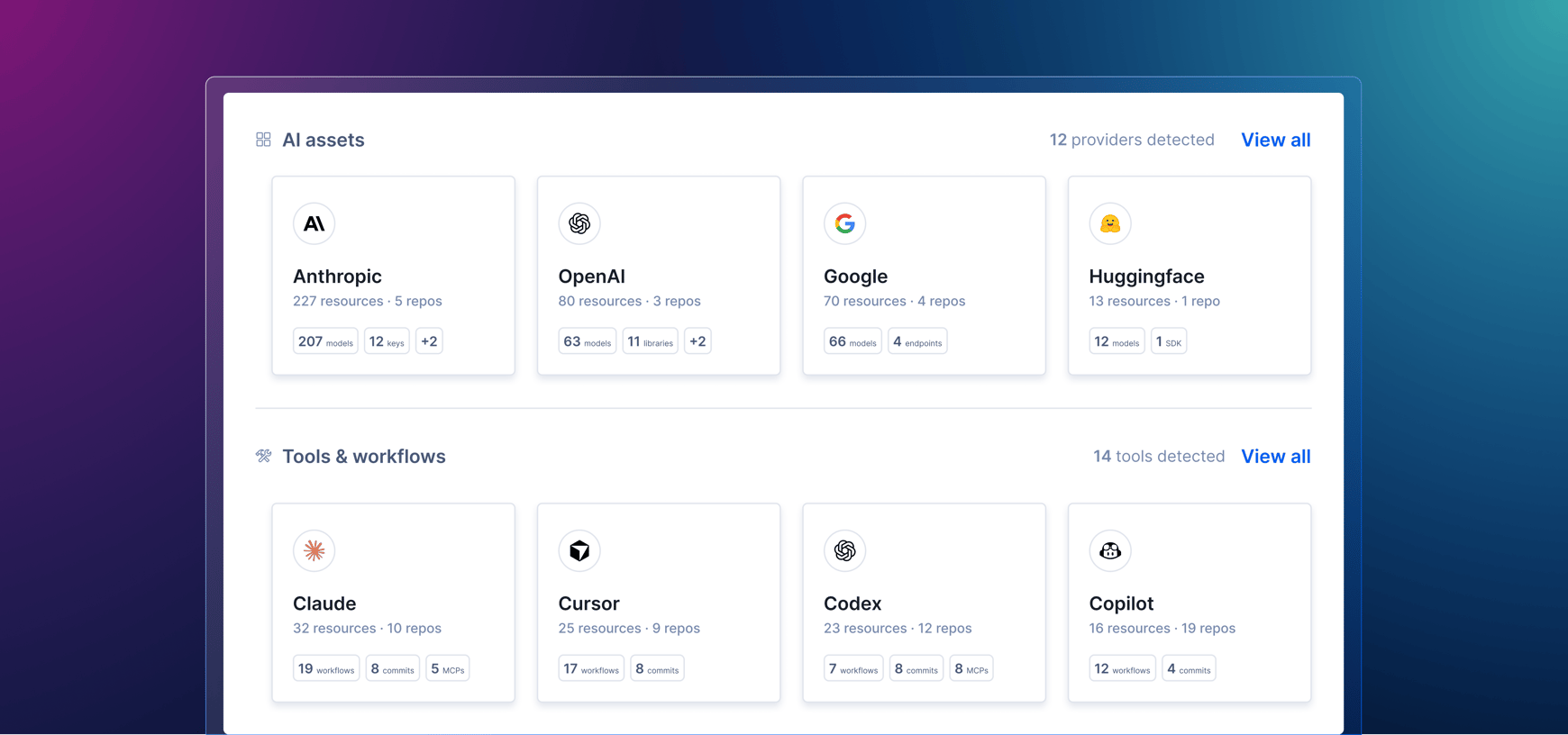
To help users access the new findings easily, we moved the AI Risk Hub to its own tab in the organization view and added two new sections.
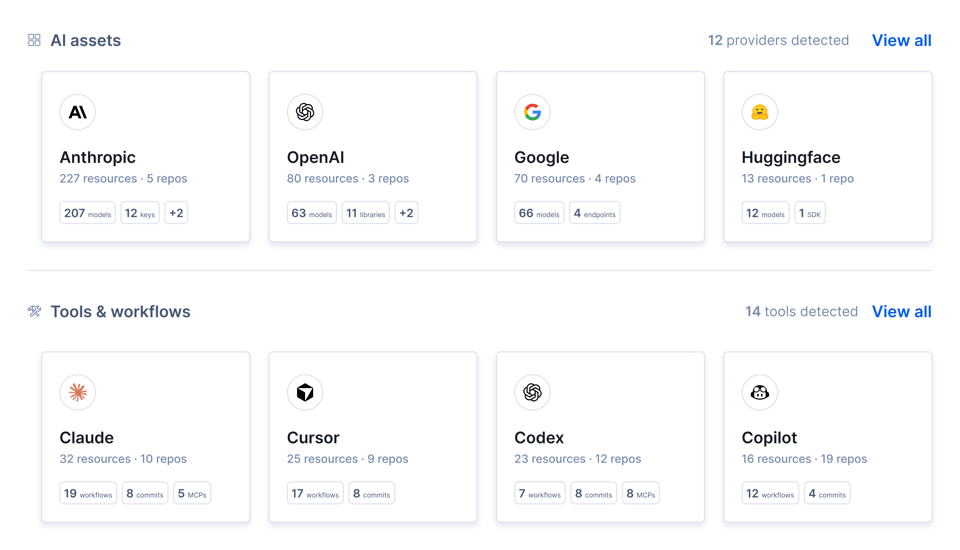
AI Assets Tab
The AI Assets tab provides a modular view of four types of AI-related resources detected in your codebase:
- AI models
- SDKs and libraries
- API endpoints referenced in code or configurations, indicating integration with external AI services
- API key references, safely identified through variable names and environment variable patterns
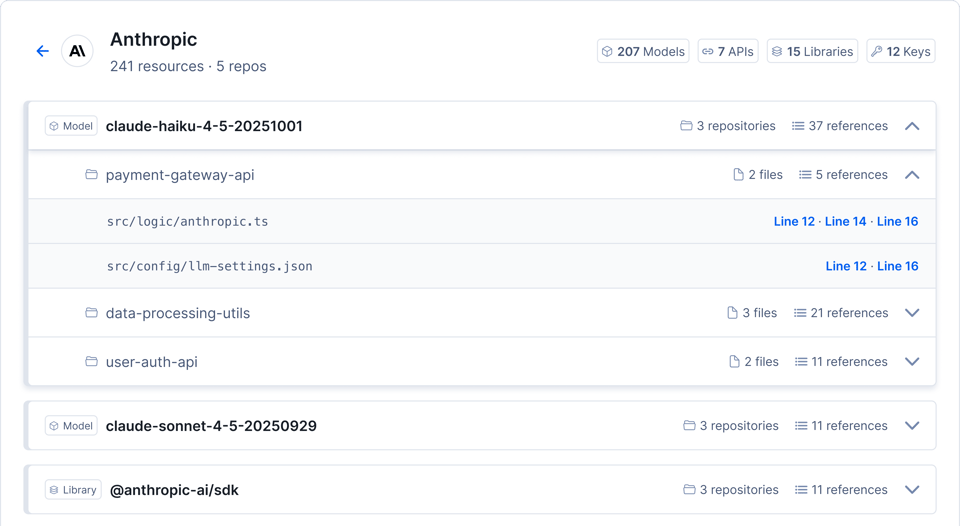
Each item corresponds to a vendor (e.g. Anthropic, OpenAI) and shows the exact repo, file, and line of code where the evidence is located.
This view is designed to surface AI usage across engineering workflows, so your team can have a full overview of:
- Which AI providers are being used
- Where AI dependencies are introduced in the codebase
- How AI-related services evolve across repositories
It creates a single inventory layer for LLM-related components that would otherwise be scattered across code, configurations, and dependencies.
Tools & Workflows Tab
The Tools & Workflows tab shows which AI dev tools (e.g. Claude, Cursor) and MCP servers are used inside your dev environments based on two types of indicators:
- Configuration files (skills, instructions, MCP server definitions, etc.)
- Git signals, such as branch naming patterns and commits co-authored by AI tools
Besides the ability to spot MCPs configured in your codebase, we are already exploring deeper MCP server analysis to detect unintended pathways into production systems, cloud infrastructure, and sensitive internal services. More on that in the What’s Next section.
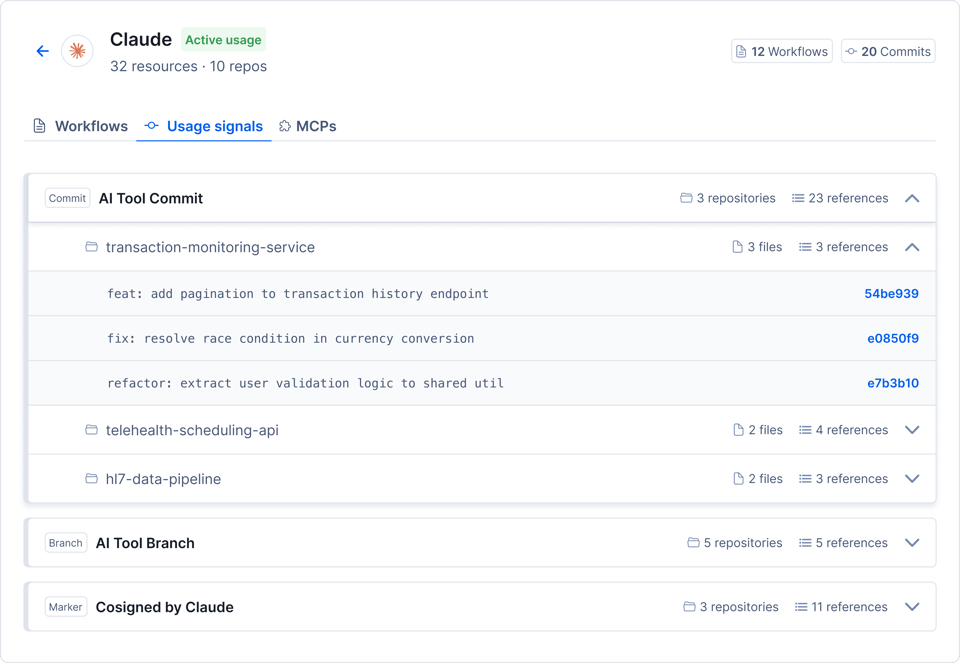
Each tool is mapped to your codebase’s workflows and configuration artifacts, alongside usage signals that help indicate whether it is actively used.
Findings can also be exported as a CSV file, as shareable evidence for audits and analytics reports.
How to get access
Codacy Business plan customers now have the option to include AI Inventory in their workspace. Pricing details are available here. If you'd like to request access, you can drop us a note.
The new AI Assets and Tools & Workflows tabs sit inside the AI Risk Hub. The Overview tab aggregates data from both, alongside AI Policy Compliance and AI Risk metrics.
You can find all the details about AI Inventory in the official documentation.
What code-level AI detection tools can’t see
Codacy AI Inventory is among the first full-fledged shadow AI detectors of this kind. As AI governance and AI risk management become a reality for tech organizations, shadow AI adoption tracking tools are bound to evolve. However, shadow AI is sneaky by definition.
Here is what AI code visibility tools like AI Inventory can’t see:
- Inline autocomplete tools (Copilot tab completions, Tabnine, Codeium, Supermaven), as they leave no repository traces unless configuration files are explicitly committed.
- Copy-paste from ChatGPT or Claude web, which is fundamentally undetectable through repository-level analysis.
- Global gitignore configurations (e.g., ~/.gitignore_global), which remain invisible to the scanner.
What’s next for Codacy AI Inventory?
Codacy’s AI Inventory is only getting started. A key area of exploration is deeper MCP server analysis, centered on how AI coding agents are wired into development environments. The focus is extended to understanding what MCP server configurations unlock: how they connect AI agents to production systems, cloud infrastructure, and sensitive internal services, and whether they introduce unintended pathways into those environments.
We are also exploring policy enforcement improvements, AIBOM exports, and AI Workflow standardization to be added in the future.
Codacy is always open to feedback from users to streamline direction. Drop us a line at support@codacy.com.